


Getting Started
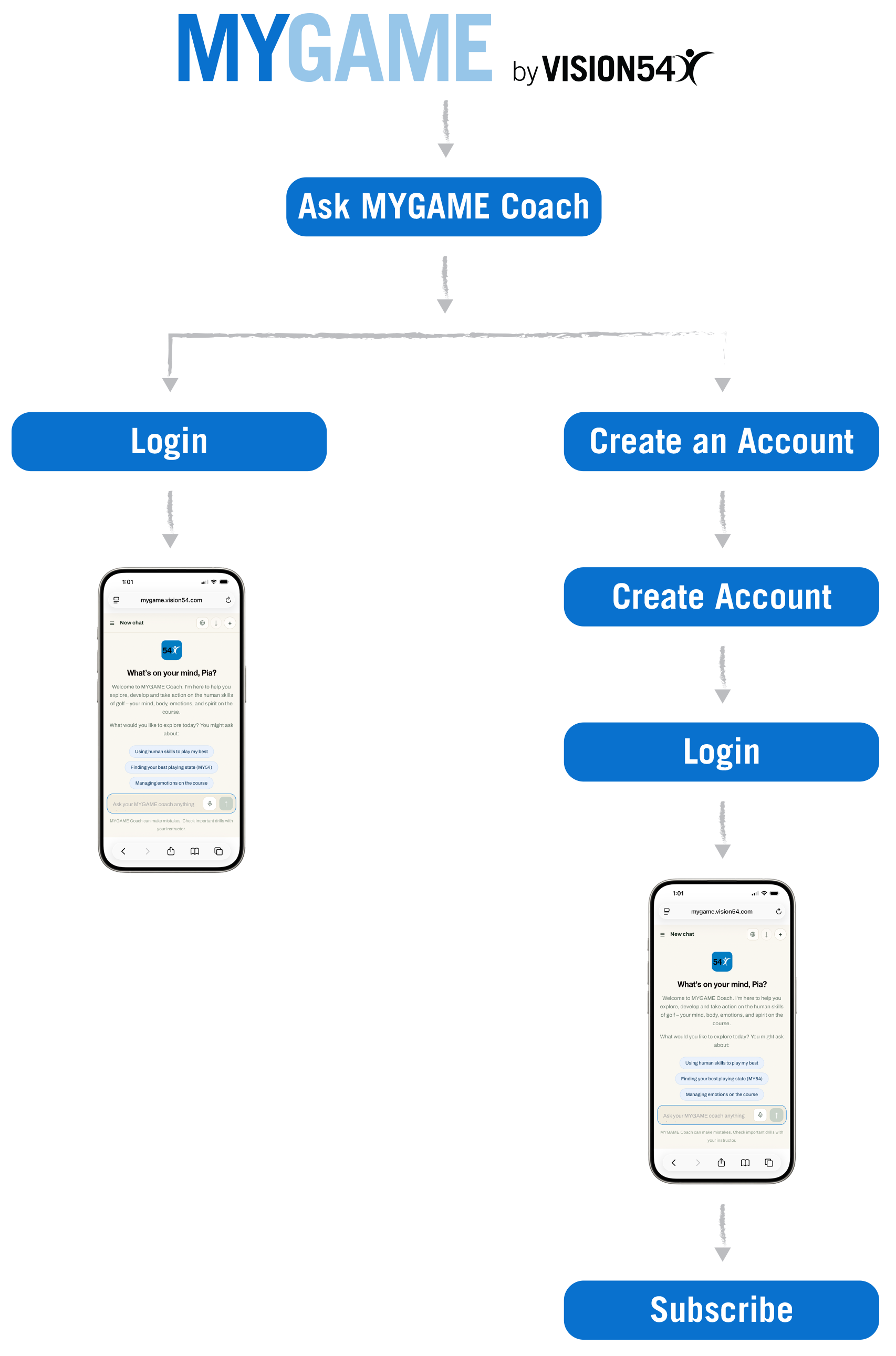
Already have an account?
Tap Ask MYGAME Coach, then tap Login to access the Chat Screen and begin exploring MYGAME Coach.
New to MYGAME Coach?
Tap Ask MYGAME Coach.
Tap the Create an Account link, below the Sign In button.
You’ll be asked to enter your name, email, and create a password. Then tap the Create Account button.
A verification code will be sent to the email address you entered in order to confirm your email. (Check your junk / spam folder if you don’t receive it.)
Enter the verification code and tap the Login button.
You’ll enter the Chat Screen to access your 10 free questions and begin exploring MYGAME Coach.
Once you’ve used those questions up, tap the Subscribe link. Choose your subscription option, enter a code if applicable, enter a credit card, and checkout.
Your 7-day free trial begins immediately. Your account will be charged on day 8, unless cancelled.
Continue exploring MYGAME Coach. Further your previous chats or begin a new one.
How it works
Add MYGAME Coach to your home screen.
Open Safari.
Go to mygame.VISION54.com
Tap the Page Menu button, then tap Share.
Scroll down and tap Add to Home Screen.
Tap Open as Web App, then tap Add.
